Service Offerings

Explore tailored services designed to solve business challenges and support growth

Industries

Discover industry-focused expertise built to meet unique business needs

Partners

Meet our service partners who strengthen delivery and support client success

Learn how to modernize data foundations to enable trusted, scalable AI.

Global supply chain leader in apparel embarks on unified analytics strategy with Microsoft Fabric

See how a unified data strategy built faster insights and scaled analytics.

Microsoft solutions partner for Data & AI

Products

Explore our digital products built to streamline work and drive growth every day

Partners

Meet our product partners who enhance our solutions and expand client value

AI-powered automated
 regression testing: Your
kickstart for 2026

Explore a better way to speed up testing and improve release quality.

Resources

Access blogs, case studies, events, and insights that support smarter decisions.

Latest Resources

CASE STUDY

HamiltonJet transforms regression testing on Infor CloudSuite with Fortest

NEWS

Fortude earns Microsoft Azure Infrastructure Solutions designation

Our People

Discover a culture where you can grow and shape what’s next

Everyone can grow at Fortude

We believe in creating a global workplace where everyone can grow. This is amplified by our teams, who say the best thing about Fortude is our culture, one that is brought to life by a diverse team that spans across continents.

Latest

Fortude builds momentum for women in tech with all-female Ignite 2.0 tech internship

Aug 22, 2025

Pioneering innovation and inculcating learning in the age of AI

Aug 01, 2024

About us

Learn who we are, what we do, and the values that drive our growth

News & events

Stay updated with Fortude news, events, stories, and company highlights.

Contact us

Get in touch with our team to ask questions or start a conversation

Your nearest office- Sri Lanka

Fortude (Pvt) Ltd
146 Kynsey Road, Colombo 7, Sri Lanka

Email – talk-to-us@fortude.co
Phone – +94 11 453 1531

What defines us goes beyond what we do

Every day, we bring together diverse perspectives, strong leadership and responsible thinking to build a business that creates lasting value for our clients, people and communities.

Fortude secures major Solutions Partner achievement with Analytics on Microsoft Azure Specialization

Office locations

Data & AI

Boost Infor CloudSuite’s Order Capture With Com

4 MIN READ

September 28, 2020

Share

Introduction

From placing a customer order to delivering goods, having robust COM processes ensure a strong bottom line, positive impact to the cash flow, and increased customer satisfaction. Customer order placement—the head of the COM process—is a critical step. At this point, the customer service representatives should have the visibility to information such as inventory availability and the agility to complete order placements fast. Inability to ensure information accuracy at this level can cause issues when allocating, picking, and shipping goods.

This blog post explains the means through which Fortude Customer Order Manager can streamline the customer order management in your Infor M3 or CloudSuite ERP solutions.

Capture all information in one place

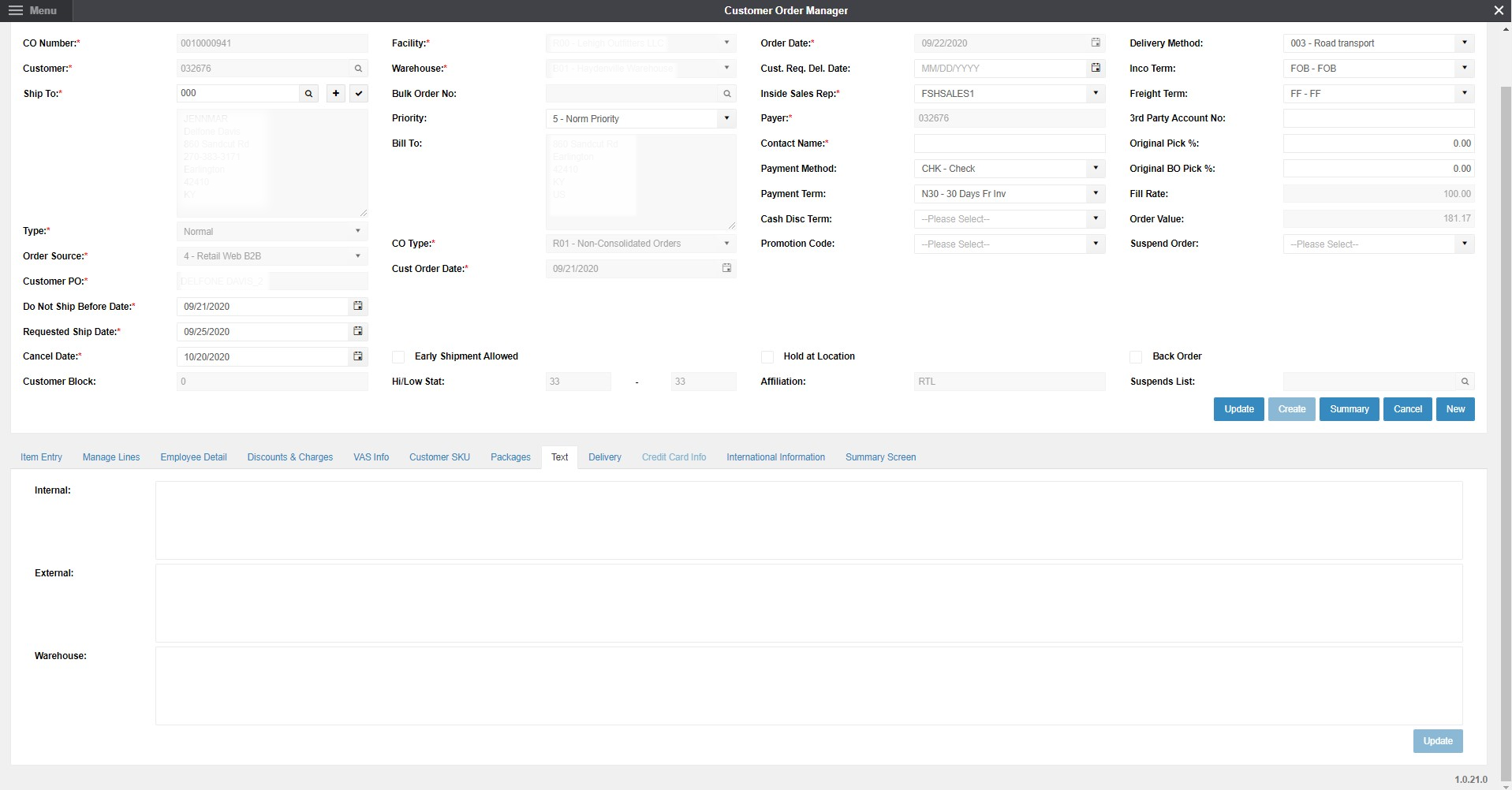
Fortude Customer Order Manager provides a unified interface for business users to capture order information required to initiate the order. In standard M3, to capture order information, users have to go through multiple panels and switch between multiple programs. Fortude Customer Order Manager irons out this inefficiency by providing a single interface to capture order information. This allows business users to complete the data entering process fast. Also, the ability to see all information in one place increases efficiency and reduces margin for error.

Figure 1: Fortude Customer Order Manager interface

SKU Matrix

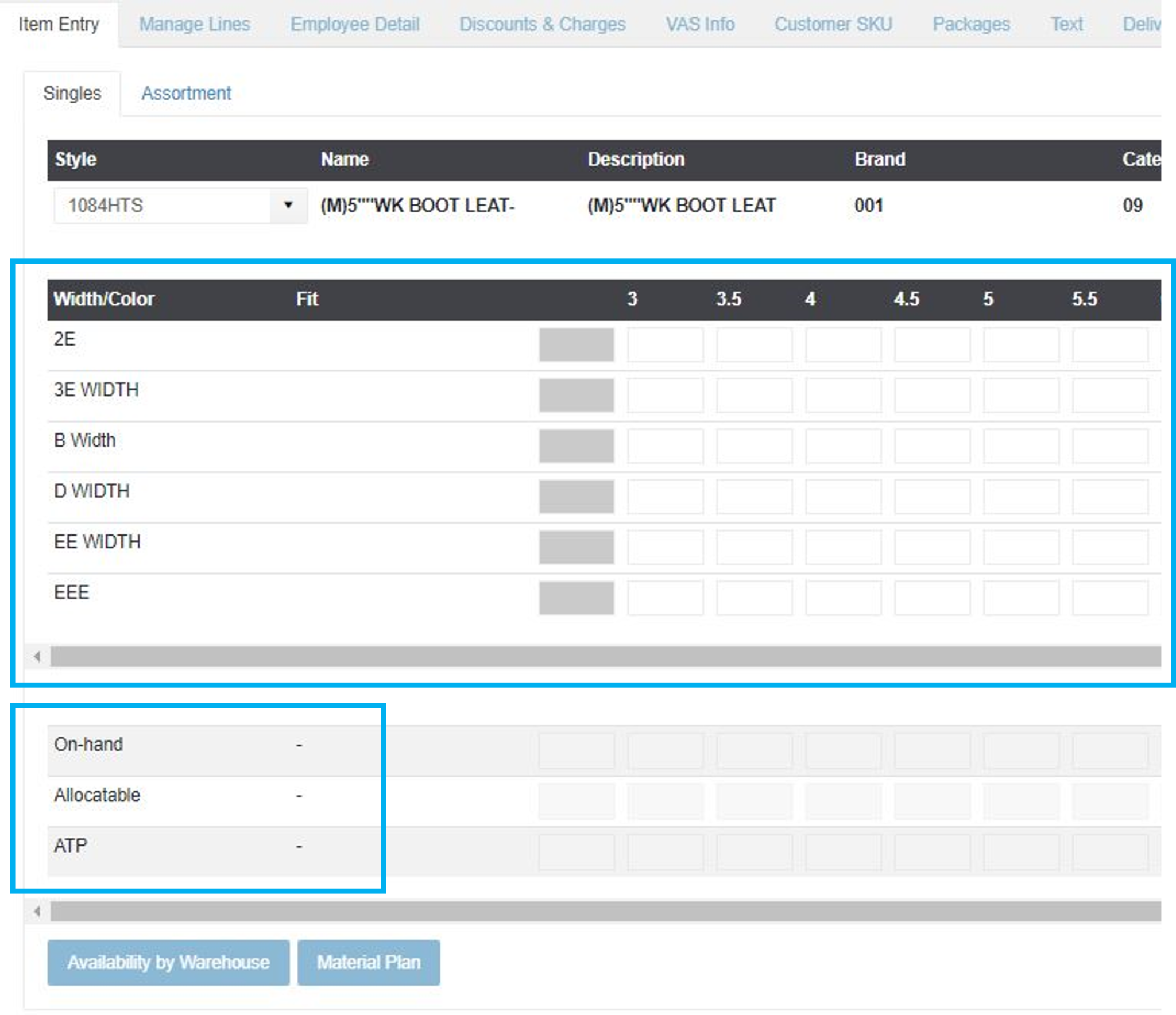
Customers do not purchase products; they purchase stock-keeping units (SKUs). An SKU represents a combination of different product properties, such as color and size. The Fortude Customer Order Manager provides an SKU Matrix interface, which allows customer service representatives to enter quantities on a grid. Each cell in the grid represents an SKU.

The SKU Matrix increases visibility and helps customer service representatives to feed SKU quantities fast.

Figure 2: SKU Matrix

In addition, the SKU Matrix indicates On-hand, Allocatable, and Available-to-promise (ATP) quantities below the grid, for each SKU. Having these information at hand allows customer service representatives to make quick decisions.

Before confirming the SKU quantities, Fortude solution validates SKU quantities based on On-hand, Allocatable, and Available-to-promise (ATP) quantities, and displays a popup, allowing users to Accept ATP or Accept Shortage.
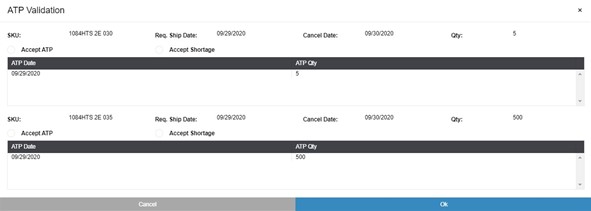
Figure 3: SKU quantity validation popup

Accept ATP

The customer service representative can select this option if the customer agrees to proceed with the ATP stock.

Based on the capacity of the manufacturer or the supplier, and the required shipment date, the popup displays the ATP schedule for each SKU that does not have on-hand stock.

Accept Shortage

The customer service representative can select this option if the order has to be accepted despite the shortage. The representative may select this option if the business can fulfill shortages by moving items between warehouses or through other means.

FAQ

Inbuilt credit card authorization

The Fortude Customer Order Manager also provides the ability to process credit card authorizations within the interface. To do this in standard M3, users have to switch to a different program and reenter customer information.

FAQ

Manage additional charges

In addition to the standard charges in M3/CloudSuite, the Fortude Customer Order Manager allows setting up predefined or calculated charges based on custom rules.

For example, based on the order quantity, a business can configure a Small Order Charge. If changes are made to the order quantity, the Customer Order Manager recalculates the Small Order Charge.

A summary of all header charges can be viewed under the Header Charges tab.

Figure 4: Summary of charges

FAQ

Capture additional information with text notes

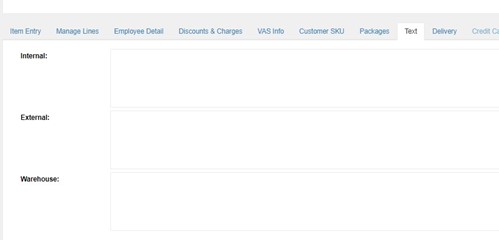
Using the Text tab, customer service representatives can provide additional information or instructions. In the following example (Figure 5), the Customer Order Manager has been configured to provide information for internal and external users and warehouse personnel.

Figure 5: Text note fields in the Customer Order Manager

FAQ

Built-in data validations and permission controls

Fortude Customer Order Manager can validate data at the entry level based on custom business logic before posting them to M3. Organizations can use permission controls to authorize only a selected group of users to update specific fields.

If you receive order information through a call center, Fortude Customer Order Manager is ideal for your business as they can significantly improve the productivity and the user experience of your customer service representatives. In addition, by improving accuracy and speed, Fortude Customer Order Manager can help you build better relationships with your customers, who play a key role in your business’s success.

Written by:

FAQ

“ Charlie’s agentic capabilities are specifically designed to address the volatility inherent in fashion and retail planning.”

– John Doe

Global supply chain leader in apparel
embarks on unified analytics

In production, AI agents optimize processes for waste reduction and improved sustainability.

CONTENTS

Introduction
Capture all information in one place
SKU Matrix
Accept ATP
Accept Shortage
Inbuilt credit card authorization
Manage additional charges
Capture additional information with text notes
Built-in data validations and permission controls

Receive the latest
Fortude Newsletter
updates.

Share

Receive the latest
Fortude Newsletter
updates.

Share